Features & Enhancements
Back to updates

Simplified search menu for clearer navigation

Boost
Published
December 12, 2025
Improvement

We know that navigating through multiple search options can get confusing. That’s why we’ve completely tidied up the Search menu to make your workflow smoother.

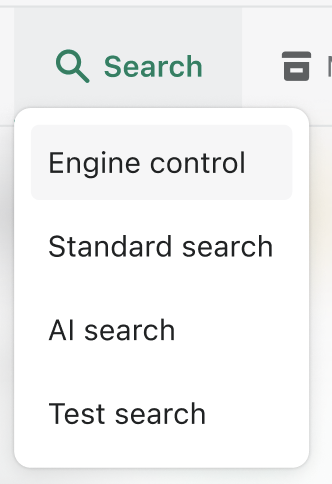
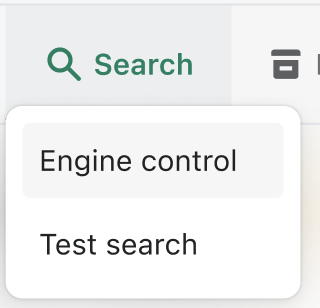
  • Centralized control: We removed the separate "Standard Search" and "AI Search" options from the main dropdown. Now, everything lives under Engine control, giving you a single, organized view where you can access every tool via clear "Edit" buttons.
  • Easier navigation: Once you click into a specific setting, like Relevance settings or AI Synonyms, we added a handy Back button next to the title so you can easily return to the main hub.
  • Less clutter: To keep your workspace clean, we removed the "General Settings" page and the old sidebar tabs on individual screens. Now, each screen is focused entirely on the specific function you are editing.
search menu boost commerce
Above is the search menu before this update.
updated search menu boost commerce
Above is the search menu after this update.
We have streamlined the Search menu to make managing your settings faster and more intuitive. By organizing features into a single Engine control hub, you can now find exactly what you need without getting lost in tabs.
Share this post

Start your 14-day free trial

Start your 14-day free trial

Start your 30-day free trial

Start your 7-day free trial

Simple & transparent pricing for all businesses

Join over 4,000+ brands already growing with Boost.
Strengthen trust and drive higher conversions.
Join over 4,000+ brands already growing with Rich Returns.
Grow your email & SMS list, increase engagement, and generate sales. Join Viralsweep today.
Address Validator offers flexible pricing that evolves with your business. Try the leading address validation tool for free now.