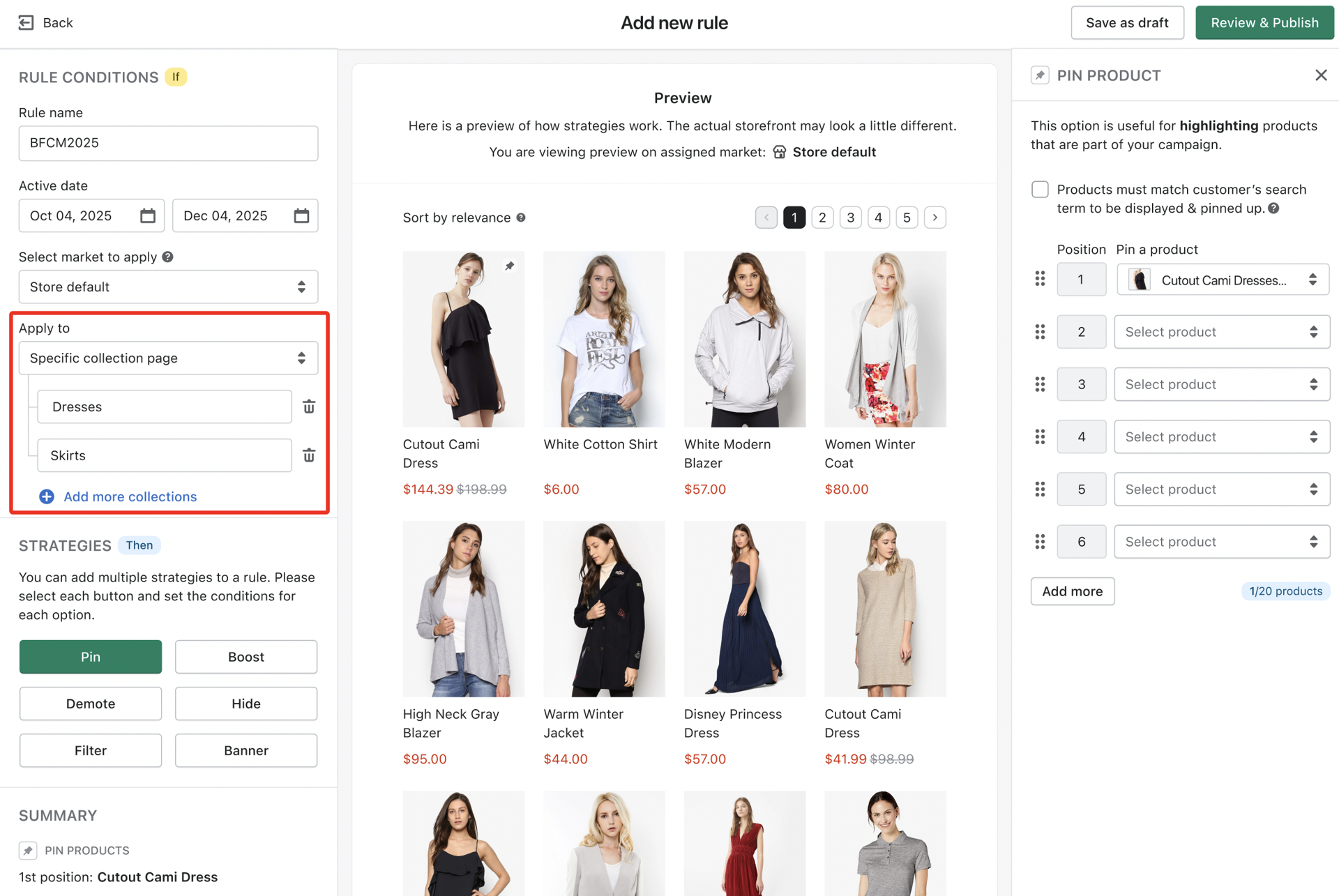
Apply one merchandising rule for multiple collections
Boost
Published
•
December 12, 2025
Feature Enhancement
We know that setting up the same rule for related collections, like "Men's T-Shirts" and "Women's T-Shirts", can be tedious and repetitive. We have updated the Campaign settings to remove that friction and help you manage your strategy more efficiently.
Bulk application: You can now apply a single merchandising rule to up to 20 different collections simultaneously. This is perfect for sitewide sales or applying a uniform look to broad product categories.
Seamless consistency: By managing multiple collections from one central rule, you eliminate the risk of errors and ensure a unified product discovery experience across all your selected pages.
Smart preview: To give you total confidence before publishing, the preview section now dynamically updates to reflect the products in the specific collection you are currently selecting.
A/B testing: Merchandising rules including mutiple collections can be used for A/B testing campaigns. This means you can now compare the performance of different rule configurations that affect a wider range of your product offerings.
We are streamlining your workflow by allowing you to apply a single merchandising rule to multiple collections at once. You no longer need to manually duplicate the same strategy for similar categories, saving you time while ensuring a consistent shopper experience. This update lets you scale your merchandising efforts instantly across up to 20 collections with just one setup.